Infinite canvas for visual note-taking

The infinite canvas to capture, organize, and revisit your ideas

Pluume is a personal tool for note-taking and visual organization on an infinite canvas. It helps you capture ideas, use your spatial memory, add reminders, keep attachments, and quickly find your active topics again. Built as an alternative to Notion for people who want less imposed structure, and as an alternative to Obsidian for people who want less technical overhead, Pluume keeps your notes visible, movable, and easy to revisit.

Capture first, organize later, and keep the ideas, follow-ups, files, and reminders that really matter in view.

Keep your topics alive without forcing your thinking into a rigid structure

Pluume captures quickly, keeps topics visible, and brings back what needs attention at the right moment.

Capture and follow-up
πŸ‘€

Keep important topics visible until the right moment

Follow-up
follow-up reminders visibility

Why Pluume stays readable as work gets denser

Pluume keeps topics visible. You can keep them in sight before deciding what to do next.

  • Important topics no longer disappear inside tools.
  • Reminders come back without cutting through your flow.

Concrete effect on day-to-day work

BeforeAfter PluumeGain
Scattered informationContinuous viewLess forgotten
Lost contextPersistent topicFaster decisions
You keep the right topic in the right place until it is time to act.
🎯

Take the note first, shape it later

Free instant capture
free capture

A free note before the method

Everything starts here: an idea, a sentence, a point to revisit.

  1. You write quickly.
  2. You structure later, if it becomes useful.
Product view

One place to keep notes, reminders, and documents where they belong.

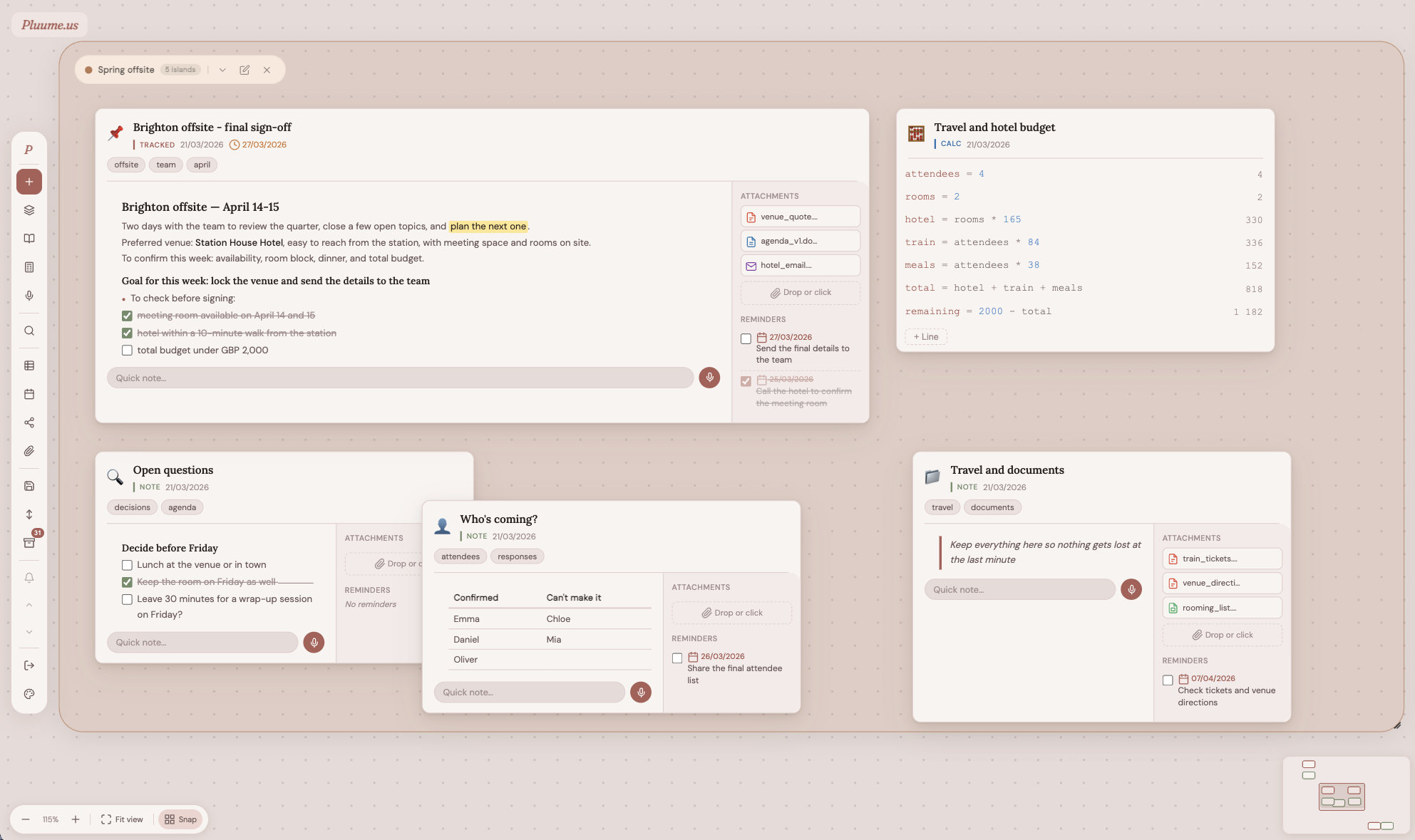
The Pluume canvas brings together active topics, useful attachments, and reminders that need to return in a continuous reading flow, easier to revisit than a stack of pages or folders.

Screenshot of the Pluume canvas with cards, reminders, and attachments
Other views

Switch views without losing the thread.

The same topics can also be reviewed differently: in time to see what keeps coming back, or as a graph to surface links between topics, tags, and groups.

Timeline view

Pluume brings deadlines and reminders into one simple reading of time. Dated topics stay readable so you can see what is urgent, what is coming up, and what can wait.

Graph view

The graph view surfaces links between topics: shared tags, belonging to the same group, or matching deadlines. Clusters reveal sets of topics that are already working together.

How does a thinking canvas work?

Less sorting. More clarity.

A thinking canvas lets you place topics in space before forcing them into structure. Pluume uses that logic for visual note-taking, spatial organization, and bringing important topics back into view. According to McKinsey research, knowledge workers spend an average of 2.5 hours per day searching for information. Pluume addresses that directly: topics stay visible, spatial, and easy to retrieve.

How it works

Real work moves through topics, deadlines, and things you need to keep in mind.

Pluume follows that movement instead of locking it into a frozen hierarchy. The same topic can start as a quick note, turn into a follow-up, collect attachments, go through a simple calculation, and later be archived without being lost.

1

Capture

A note, a voice memo, or an attached file: the entry point needs to be immediate.

2

Place

The topic finds its place in space. Its position and its neighbors already carry meaning.

3

Bring it back

Reminders, deadlines, and hot points come back at the right moment, visually, without breaking the flow.

Concrete uses
Management
People topics, customer feedback, decisions to revisit, and points to keep visible before choosing.
Operations
A drifting file, an important reminder, a key attachment, or a quick impact check before deciding.
Project work
Ongoing topics, blockers, next steps, useful documents, and deadlines visible in one place.
Analysis
A hypothesis to revisit, an estimate to recalculate, an idea that is still vague but needs to stay visible.
Writing
Core ideas, plans, references, captures, attached files, and threads to pick up again without losing momentum.
Why Pluume instead of Notion or Obsidian?

An infinite canvas for thinking, not just filing.

If you are choosing between a visual tool, a structured documentation system, or a Markdown knowledge base, here is what Pluume changes in the way you actually work.

Pluume

The right choice if you want to capture quickly, organize in space, revisit topics through spatial memory, and work alone without extra heaviness.

  • Infinite canvas and visual note-taking
  • Reminders and attachments directly on topics
  • A personal tool centered on real work

Compared with Notion

Notion is excellent for pages, databases, wikis, and collaboration. Pluume is better if your main need is to think visually and keep topics alive.

  • Less structural friction at the start
  • Less team-centric and less formal-documentation oriented
  • More focused on quick capture and spatial context

Compared with Obsidian

Obsidian works well for people who like Markdown files, knowledge links, and plugins. Pluume is simpler if you want a visual, less technical, and more direct alternative.

  • Less setup and fewer technical concepts
  • Organization through space before hierarchy
  • More immediate reading of reminders, files, and active topics
Modes

Four ways to keep a topic alive.

Each topic stays lightweight, but can take on just enough structure depending on its actual state.

Free

The immediate drop

An idea that is not structured yet, but too important to leave out of sight.

β€œRevisit portfolio organization after the field feedback.”
Follow-up

The topic that needs to come back

Deadlines, reminders, and passive visibility. The topic becomes a useful marker in time.

Reminder: leadership follow-up
Deadline: 12/31
Attachments

Files stay attached to the right topic

PDFs, images, documents, spreadsheets, or saved emails: files stay with the note, in the right context.

Attached files: meeting-notes.pdf, budget.xlsx, client-email.msg
Inline calc

Quick calculations stay inside the topic

Variables, formulas, and estimates stay embedded in the same card instead of drifting into a disconnected sheet.

delay * 0.85
476
Guides and comparisons

Go deeper depending on how you work.

Every tool has strengths. These pages compare Pluume with its closest alternatives and dig deeper into the use cases so you can choose with clear trade-offs in mind.

Alternative to Notion

For people who want to capture quickly and think visually without Notion’s imposed structure.

Read the comparison

Alternative to Obsidian

For people who want less Markdown, fewer plugins, and a more immediate way to read their notes.

See the dedicated page

Alternative to Bear

For people who want cross-platform access, reminders, and spatial organization beyond Bear's Apple-only list view.

Read the comparison

Alternative to Milanote

For knowledge workers who need text-first topic tracking with reminders and deadlines, not a visual mood board.

Read the comparison

Thinking canvas

What a thinking canvas is, and how spatial memory helps keep complex topics visible.

Understand the concept

Visual note-taking

How visual note-taking helps you find and revisit topics faster than a linear list.

Explore this page
Who is Pluume for?

For people who think better when their topics stay visible.

Pluume is for professionals and creators who want an alternative to Notion or Obsidian for personal work, with more visual freedom and less complexity.

Not another tool to sort everything afterward. A space to think while the work is arriving.

Managers

To track sensitive topics, people, decisions, and files that keep returning quietly in the background.

Ops and specialists

To keep useful information, attachments, timelines, and small analyses together without rigidifying the gesture.

Knowledge workers

For people who find Notion too heavy, Obsidian too technical, and need a space for immediate capture.

Personal use

Designed for individual work. No invasive collaboration noise. Just a space where your thinking still feels like your own.

Use cases

What you can actually do with Pluume.

Concrete examples to show how Pluume can help in everyday work, from quick capture to following complex topics over time.

Personal note-taking

Capture ideas, links, reminders, and documents in the same space, then let structure emerge instead of forcing it upfront.

Following ongoing topics

Keep decisions, conversations, blockers, and deadlines visible without scattering them across multiple tools.

Preparing decisions

Gather hypotheses, small calculations, attachments, and reminders so you can come back to the right context at the right time.

A lighter alternative to Notion

If pages, databases, and templates feel too heavy for thinking fast, Pluume offers a more direct and more visual space.

A visual alternative to Obsidian

If you do not want to manage Markdown, folders, and plugins, Pluume focuses on spatial reading and simplicity.

Organization with spatial memory

Placing topics in space helps you retrieve information and relationships between ideas more quickly.

FAQ

Frequently asked questions about Pluume.

Answers to the most common questions about how Pluume works, what it is for, and where it fits.

What is an infinite notes canvas?

An infinite notes canvas is a free visual space where you place ideas without page limits, folder limits, or imposed order. It helps you capture first and organize later. According to McKinsey Global Institute, knowledge workers spend up to 28% of their workday searching for information β€” a canvas that keeps active topics always visible directly reduces that overhead.

How is Pluume different from Notion?

Pluume emphasizes visual note-taking, spatial memory, and personal follow-up. Notion is more focused on pages, databases, structured documentation, and team collaboration.

How is Pluume different from Obsidian?

Pluume is more direct and more visual for capturing and revisiting topics. Obsidian targets users who are comfortable with Markdown, files, plugins, and building a knowledge graph.

Is Pluume made for project management?

Pluume is useful for tracking topics, deadlines, blockers, and documents in a personal workflow. For heavy collaborative project management with workflows and team reporting, it is not the primary positioning.

Can I capture files and reminders?

Yes. Each topic can include attachments and reminders, so information, context, and the moment it should resurface stay together.

Can I create an account today?

Not yet. Registrations are temporarily closed. Join the waitlist and we'll email you when access reopens. Existing users can still sign in right away.

Is Pluume an individual tool?

Yes. The product is designed first for personal use: capturing, organizing, and revisiting ideas without collaboration noise. Most knowledge workers use 4 to 8 apps per day (Asana Anatomy of Work Index) β€” Pluume aims to be the frictionless personal thinking space that sits alongside those tools, not another team platform requiring ongoing setup.

How does a thinking canvas work?

A thinking canvas lets you position topics visually according to their proximity, importance, or current state. That spatial organization supports memory and helps you recover the right context faster.

How does Pluume compare to a digital whiteboard like Miro or Excalidraw?

Miro and Excalidraw are built for drawing, diagramming, and visual collaboration with teams. Pluume is a personal note-taking tool: it centers on text-based topic cards with reminders, attachments, and deadlines β€” not free-form drawing or real-time collaboration.

Does Pluume work as a second brain tool?

Yes, for active topics and ongoing work. Pluume keeps living ideas visible, lets them grow with notes and files, and brings them back with reminders. For long-term archival of finished knowledge, a more structured tool may complement it β€” but for your active thinking layer, Pluume fits that role directly.
Opening soon

Pluume opens again soon.

If this way of working feels right, join the waitlist now. You will choose Free or Pro when registrations reopen.